The AIO On-Page Checklist: llms.txt, Entity Schema, and Extractable Answers
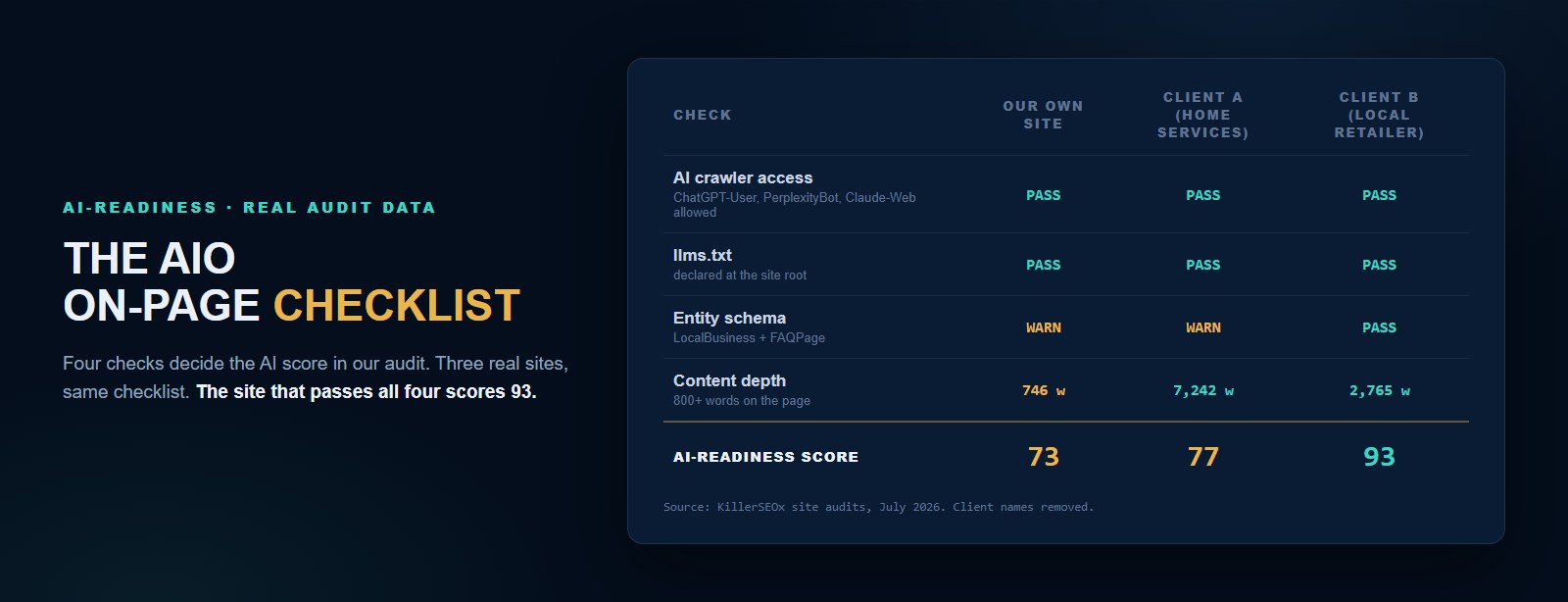
Our site audit gives every business an AI-readiness score, and the same four checks decide it every time. I pulled three real audits from our own fleet this week: one scored 93, one scored 77, and the third scored 73. The 73 is our own marketing site. This post is the checklist behind that score, with the copy-paste fixes included.
AIO advice tends to be either mystical or useless. "Optimize for AI" is not an instruction. So here's the opposite: the four on-page items our audit actually checks, why each one matters to a language model deciding whether to cite you, and what passing looks like in the real HTML. Everything here is something you or your web person can ship this week.
- Four on-page checks drive the AI-readiness score: AI crawler access in robots.txt, an llms.txt file at the site root, entity schema (LocalBusiness or Organization plus FAQPage), and extractable answers with real content depth.
- From three real audits in our fleet: the site passing all four checks scored 93, a site missing LocalBusiness schema scored 77, and our own site, thin on homepage content at 746 words, scored 73.
- Blocking AI training crawlers like Bytespider does not hurt your AI visibility. Blocking retrieval crawlers like ChatGPT-User and PerplexityBot absolutely does, because those fetch your pages at answer time.
- An llms.txt file takes under an hour and almost no sites have one. Adoption by the AI companies is still early, so treat it as cheap insurance, not a ranking lever.
- Extractable means liftable: a 40 to 60 word answer directly under a question heading, in the HTML, that a model can quote without cleanup. AI models don't skim. They lift.
What is the AIO on-page checklist?
The AIO on-page checklist is four items: allow AI retrieval crawlers in robots.txt, publish an llms.txt file at your site root, mark up your pages with entity schema (LocalBusiness or Organization plus FAQPage), and structure content as extractable answers with at least 800 words of depth. These four checks drive the AI-readiness score in our audit.
Each check maps to a stage of how an AI model uses your site. Crawler access decides whether the model can fetch your page at all. llms.txt tells it where the good content lives. Entity schema tells it what your business is, in a format it doesn't have to guess at. And extractable answers give it something it can quote. Fail an early stage and the later ones never get a chance to work.
I've written before about what AI optimization is and why it decides who gets recommended. That post covers the strategy. This one is the wrench-turning: the exact on-page work, in order, with real scores from real sites showing what each miss costs.
Can AI models even reach your pages?
Check robots.txt first. AI retrieval crawlers such as ChatGPT-User, OAI-SearchBot, PerplexityBot, and Claude-Web fetch your pages at answer time, so blocking them removes you from AI answers entirely. Training crawlers like Bytespider are different: you can block those to protect your content with no visibility cost.
This is the check people get backwards most often. Sometime in the last two years, "block the AI bots" became default advice, and plenty of security plugins and CDN settings now do it wholesale. The problem is that the bots are not one thing. Retrieval crawlers fetch your page the moment a user asks a question. If ChatGPT wants to cite a plumber and your site refuses its crawler, it cites the plumber next door instead.
Training crawlers are a separate decision. One client in our fleet blocks Bytespider, a training crawler, while allowing every retrieval crawler through. Their audit passes with a note that this is a deliberate content-protection stance, and their AI visibility doesn't lose a thing. That's the configuration I'd recommend to most businesses: protect your content from harvesting if you want, but never at the cost of answer-time access.
Here's the robots.txt shape that gets it right:
All three sites in this week's audit pull passed this check. That's not luck. It's the first thing we fix on every new account, because everything else on this list is wasted effort if the crawlers bounce off the front door.
What is llms.txt and does it actually matter?
llms.txt is a plain markdown file at your site root that tells AI models what your business is and where your most useful pages live. It's an emerging standard, not a guarantee: adoption by AI companies is still early. But it costs under an hour, and almost none of the sites we audit have one.
Think of it as a menu you hand the model instead of making it rummage through your kitchen. A crawler that finds llms.txt gets a curated summary: who you are, what you do, which pages carry the substance. Without it, the model reconstructs your business from whatever pages it happens to fetch, nav clutter and all.
I'll be straight about the evidence, because this is where AIO advice usually starts overselling. No major AI company has committed to honoring llms.txt, and nobody can show you a controlled study proving citations went up because of it. What I can tell you from our own audit data is that almost no business sites have implemented it, which makes it one of the few places a small business can genuinely be ahead of the market for an hour of work. Cheap insurance, early advantage, no downside. That's the honest pitch.
The format is deliberately simple. Here's a working example for a fictional plumber:
Save that as /llms.txt, adjust the content, done. If you want the bigger version, add /llms-full.txt with deeper content for models to ingest. Our own site carries both, and it's one of the two AI checks we actually pass. Which brings me to the embarrassing part of this post.
What entity schema do AI models actually read?
Two schema types do most of the work: LocalBusiness (or Organization for national companies), which tells models what your business is, where it operates, and how to reach it, and FAQPage, which hands them ready-made question and answer pairs. In our fleet's audits, sites carrying both consistently score highest on AI readiness.
Schema is structured data: a block of JSON in your page's HTML that states facts about your business in a format machines parse without guessing. Google has read it for years. AI models read it too, and they lean on it hard when deciding which businesses are real, established, and safe to recommend.
The three audits I pulled this week tell the story cleanly. The site that scored 93 carries LocalBusiness and FAQPage schema both, on top of 2,765 words of content. The site at 77 has FAQPage but no LocalBusiness, and that single gap is flagged in its audit as the difference. And our own marketing site sits at 73, dinged for missing exactly the schema types AI models prioritize for business recommendations. The checklist doesn't spare its own maker. It never should.
A minimal LocalBusiness block looks like this, wrapped in a script tag with type application/ld+json in your page head:
Use the most specific type schema.org offers for your trade (Plumber, RoofingContractor, HairSalon), keep every fact identical to your Google Business Profile and your directory listings, and never mark up ratings you can't back with real reviews. Models cross-reference. A schema block that contradicts your own citations reads as noise, or worse, as deception.
Want your own AI-readiness score?
The free audit runs this exact checklist against your site in about 60 seconds, along with your rankings and what six AI models say about you. No card, no signup.
Run my free auditWhat makes an answer extractable?
An extractable answer is a complete, self-contained response of roughly 40 to 60 words sitting directly under a question heading, in the page HTML. A model can lift it verbatim without cleanup. Pages built from question headings and tight answers get quoted; pages built from winding narrative get skimmed and skipped.
You're looking at the format right now. Every section of this post opens with a question heading and a boxed answer that stands alone. That's not a design flourish. When an AI assistant summarizes a page, it hunts for exactly this shape: a claim it can quote that survives being separated from everything around it. Give it one per question and you've done the model's work for it, which is precisely why it picks you.
The audit measures the depth side of this as a word count, and the threshold is real: pages under about 800 words rarely have enough substance to cite. Our own homepage sits at 746 words and takes the warning. The 93-scoring site carries 2,765 words. The 77 site carries 7,242, which tells you depth alone doesn't win, structure and schema have to come with it.
Three structural moves cover most of it. Phrase your headings as the actual questions customers ask, not clever labels. Put a complete answer in the first sentences under each heading, not three paragraphs of wind-up. And keep your FAQ answers in real HTML, accordions are fine because the text stays in the markup, but JavaScript that injects answers after page load can leave a crawler staring at an empty div. I covered how those lifted answers surface when someone asks about your business by name in the ChatGPT post.
How do you score your own site?
Run an audit that checks all four items and gives you a number to beat. Ours takes about 60 seconds, scores AI readiness alongside speed, technical health, and on-page SEO, and turns every miss into a specific action. Re-run it after the fixes ship and the score should move within one crawl.
The score is a means, not the end. What matters is that each miss becomes a task somebody actually does. In our platform the audit feeds the action engine, so a missing LocalBusiness block or a thin page shows up in the client's queue with its evidence attached, ranked against everything else worth doing that week. Our own site's 73 is sitting in our queue right now, and yes, it annoys me every time I see it.
Why does it sit unfixed while client sites score 93? Because we do client work first, and the checklist is honest about the cost of that choice. By the time you read this, the schema gap is probably closed. The point stands either way: a score you measure is a score you can move. The businesses getting named in AI answers aren't lucky. They pass these four checks, and their competitors don't know the checks exist.
We run this checklist for over 20 businesses nationwide, and it's the same work whether you do it yourself from this post or let the platform track it for you free. Either way, run the audit first. You can't fix a gap you haven't seen, and your competitors' gaps are wider than you think.
Quick answers
Does llms.txt actually get read by AI models today?
Do I need both LocalBusiness and FAQPage schema?
Do FAQ accordions hide answers from AI models?
How long does the full AIO checklist take to implement?