Bing IndexNow: How Your New Pages Reach Copilot and ChatGPT
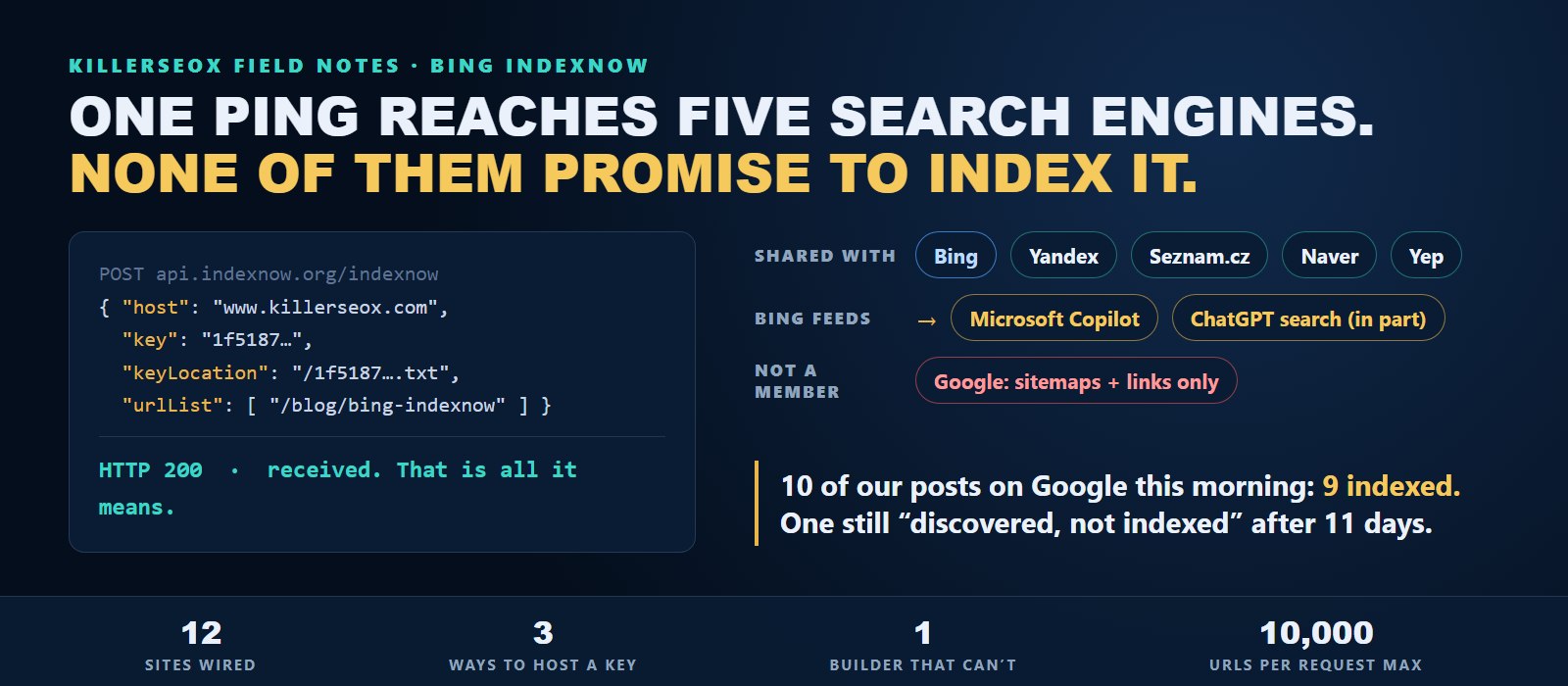
Every time we publish a page on one of the sites we run, a short message goes out to Bing within minutes. It says this URL changed, come look. That message is IndexNow, and it is the most overlooked piece of AI search visibility I know of.
Most business owners have never heard of it. Plenty of agencies never set it up. I get why, because on the surface it is nothing: one text file and one web request. But Bing's index is what Microsoft Copilot answers from, and it is one of the sources behind ChatGPT search. A page Bing hasn't picked up is a page those answers can't use. Here is what IndexNow does, how we wired it across a dozen sites, and the spots where it quietly breaks.
- IndexNow is a free, open protocol that tells Bing, Yandex, Seznam.cz, Naver and Yep that a URL was added, changed or deleted. Ping one of them and the rest get it too.
- Bing matters for AI answers, not only Bing traffic. Copilot answers from Bing, and ChatGPT search draws on third party search providers alongside OpenAI's own crawler.
- A 200 response means the search engine received your URL. It does not mean the page was crawled or indexed, and the protocol never promises either.
- The key file has to sit where it can vouch for your URLs, which on most sites means the root of the domain. Some hosts and site builders make that surprisingly hard.
- Google does not take part. Google still runs on sitemaps and links, and one of our own posts has sat unindexed there for 11 days with a clean sitemap.
What is Bing IndexNow?
IndexNow is an open protocol Microsoft Bing and Yandex launched in 2021. When a page on your site is added, updated or deleted, your site sends that URL to one participating search engine, and it gets shared with the others. Instead of waiting for a crawler to notice the change, you tell it directly.
Search engines have always found new pages the slow way. A crawler visits your site on its own schedule, follows links, and eventually trips over the new post. On a big news site that happens constantly. On a small business site it can take days, sometimes weeks. A sitemap helps, but a sitemap is a file the engine pulls when it gets around to it. Nothing is pushed.
IndexNow flips that around. It has three parts. A key, which is just a long random string. A text file named after that key, hosted on your own domain, which proves you control the site. And a request you send whenever something changes. Here is the shape of the one this site sends on every publish:
POST https://api.indexnow.org/indexnow
{
  "host": "www.killerseox.com",
  "key": "YOUR_KEY",
  "keyLocation": "https://www.killerseox.com/YOUR_KEY.txt",
  "urlList": ["https://www.killerseox.com/blog/bing-indexnow"]
}
One request can carry up to 10,000 URLs. You only have to send it to one endpoint. The participating engines today are Bing, Naver, Seznam.cz, Yandex and Yep, and they have agreed to share what they receive with each other. Bing is the one that matters most for a business in the United States, and it matters for a reason that has very little to do with Bing's own search results.
Does ChatGPT use Bing to find websites?
Partly. OpenAI says ChatGPT search pulls from third party search providers along with its own crawler, and Bing is the provider Microsoft has talked about publicly. Microsoft Copilot answers from Bing directly. So a page Bing has not indexed is harder for both assistants to find, and harder to cite.
This is why IndexNow belongs in a conversation about AI visibility and not just in a technical SEO checklist. When an assistant answers from its training data, your new post will not show up for months, if ever. When it searches live, it can only choose from what its search source already knows about. For Copilot, that source is Bing. For ChatGPT search, Bing is a big part of the picture.
We track this every week. Our six model AI tracking checks whether ChatGPT, Gemini, Claude, Perplexity, Grok and Llama mention a business for the questions its customers actually ask. The live-search assistants move faster than the rest when a site publishes something new and useful. They can only do that if the page made it into the index they read from.
Letting AI crawlers in is step one. Our robots.txt names OAI-SearchBot, GPTBot, ClaudeBot and PerplexityBot and allows every one of them, and we cover that setup in the AIO on-page checklist. IndexNow is step two. It stops you waiting for the index to find you on its own time.
What does a 200 response from IndexNow actually mean?
It means the search engine received your URL. That is all. The IndexNow documentation says it plainly. A 202 means received while your key is still being verified. A 403 or 422 means the key or the URLs failed a check. No success code promises the page will be crawled or indexed.
Our publishing engine logs the IndexNow response on every post it ships. Those logs are full of 200s, and a 200 feels like a win. It isn't one yet. It is a receipt. Here is what each response actually tells you:
- 200. The URL was received.
- 202. Received, and the engine is still verifying your key. Common on the very first ping from a site.
- 400. The request was malformed.
- 403. The key is not valid, usually because the key file is missing or does not match.
- 422. The URLs do not belong to the host you named, or the key does not fit the protocol.
- 429. Too many requests. Slow down.
The gap between received and indexed is real, and I can show you what it looks like from the other big search engine. This morning I ran Google's URL Inspection on ten posts from this blog. Nine read "Submitted and indexed," and five of those were crawled the same day they published. The tenth, our September 4 post on how to rank in AI Overviews, reads "Discovered, currently not indexed." Google has never crawled it. That is 11 days after publishing, with the URL sitting in a sitemap Google downloads without errors.
Google doesn't use IndexNow, so that example is about sitemaps, not pings. The lesson carries over exactly. Telling a search engine about a page and having that page accepted are two different events, and only one of them is in your control.
How do you set up IndexNow without breaking it?
Generate a key, host it as a text file named after the key at the root of your domain, then send a request with your host, key, key location and URLs whenever a page changes. Cloudflare, Wix and WordPress plugins like Rank Math can handle all of it. Then confirm the key file actually loads.
On August 3 we wired IndexNow across the sites we run in a single day. That fleet is a mix of platforms, and almost every type found its own way to fail.
Standard WordPress. We served the key file at the root with a small code snippet. The obvious move on WordPress is to upload the file through the media library, and it doesn't work. A key file can only vouch for URLs in its own folder or below it. A key sitting in the uploads folder can't vouch for a blog post that lives at the root of the domain.
A managed WordPress host. On one client's host, the web server returned a 404 for the missing text file before WordPress ever loaded. No plugin or snippet could answer the request, because WordPress never saw it. The only fix was a real file placed in the site root over SFTP.
Static sites on Cloudflare. The easiest of the lot. The key file lives in the site's public folder and ships with every deploy. This blog works that way.
A hosted site builder. One client's site runs on a builder that gives us no way to put a file at the root of the domain. That site still has no IndexNow. If a platform won't let you prove you own the domain, the protocol can't help you.
And the honest one. This site, our own product site, was the last to get wired, on August 6. The pings for our client sites were live three days before our own.
Why don't most sites have IndexNow set up yet?
Because nothing visibly breaks without it. Bing still crawls sites that never ping, just later. Google does not participate, so the SEO tools and checklists built around Google rarely mention it. And on some hosts and builders, getting a key file to the root of the domain takes real work.
Nobody gets an alert that says your page reached Bing four days late. There is no ranking report with a line for it. So it drifts to the bottom of the list, and that is exactly what happened to us. Before August 3, our own publishing logs on several client sites carried the same note run after run: no IndexNow key installed. The note was accurate every time. Nothing changed until we stopped treating it as a line in a report and made it a project.
The other reason is that it fails silently even when it is set up. One client's security firewall blocks the manual submission endpoint on their own site, so their SEO plugin sends the pings automatically and we can't confirm them from outside. That is fine as long as someone knows it. Most sites have nobody watching at all.
See how AI-ready your site really is
Run the free KillerSEOx audit on your own domain. About 60 seconds, no card, no trial clock.
Run my free auditDoes Google use IndexNow?
No. Google is not one of the participating search engines. For Google you still need an accurate XML sitemap, resubmitted when it changes, plus internal links pointing at the new page. IndexNow covers Bing and its partners. Do both, because the two indexes feed different assistants.
Google's AI Overviews and Gemini work from Google's own index, so everything we wrote about AI Overviews vs the local pack runs through sitemaps and links, not pings. That makes the sitemap the thing to get right, and it is easy to get wrong without noticing.
Here is ours. This blog's sitemap is a hand-maintained file. On September 10 we found it didn't include the post we had just published. The resubmission to Google had already come back as a clean success. It succeeded at resubmitting a file that didn't contain the page. We fixed the file, redeployed, and now every publish checks the live sitemap for the new URL before resubmitting.
That is the same lesson as the 200. A success code describes the request, not the result.
How do you check that Bing is actually indexing your pages?
Verify your site in Bing Webmaster Tools and open the IndexNow report, which lists the URLs Bing received from you. Check individual pages with its URL Inspection tool. Then search Bing for the exact title of a new post. If it is still missing a week later, look at the page, not the ping.
Here is the routine I would run on any site, including yours.
- Load the key file in a browser. Go to your domain, slash, your key, dot txt. It should load and show the key. If it 404s, every ping you send is wasted.
- Re-check it after any redirect or domain change. When we moved this site to its www address on August 6, the key file and the sitemap were the first two things we checked, because a bad redirect rule kills both without a single error message.
- Send the host your key actually lives on. Pinging the bare domain when your key and your canonical URLs live on www is an easy way to earn a 422.
- Log every response code. A 403 or 422 showing up after months of 200s means something changed on your site.
- Look in Bing Webmaster Tools every week for a month. Compare the URLs Bing received to the ones it indexed. A big gap points at the pages, not the protocol.
- Only ping real changes. Added, updated or deleted. Pinging unchanged pages on a timer is noise, and it is how you end up with 429s.
Then measure the part that actually pays. Getting indexed is the entry ticket. Being mentioned when a customer asks an assistant who to hire is the result, and that is what our weekly AI visibility report tracks across six models. If you want the bigger picture of how all of this fits together, start with what AIO is and how AI visibility tracking works, or find out what ChatGPT says about your business today.
IndexNow takes an afternoon to set up properly and almost nobody checks it afterward. Run the free audit on your site, or put your business on the free tier and see where you stand in AI answers this week. If assistants can't find your newest pages, make sure the index can first.
Quick answers
Is IndexNow free?
Can pinging IndexNow too often hurt my site?
Should I submit deleted pages to IndexNow?
Do I still need Bing Webmaster Tools if I use IndexNow?
Does IndexNow help with Google AI Overviews?