Your Blog Drafts Should Be Readable Before They Publish
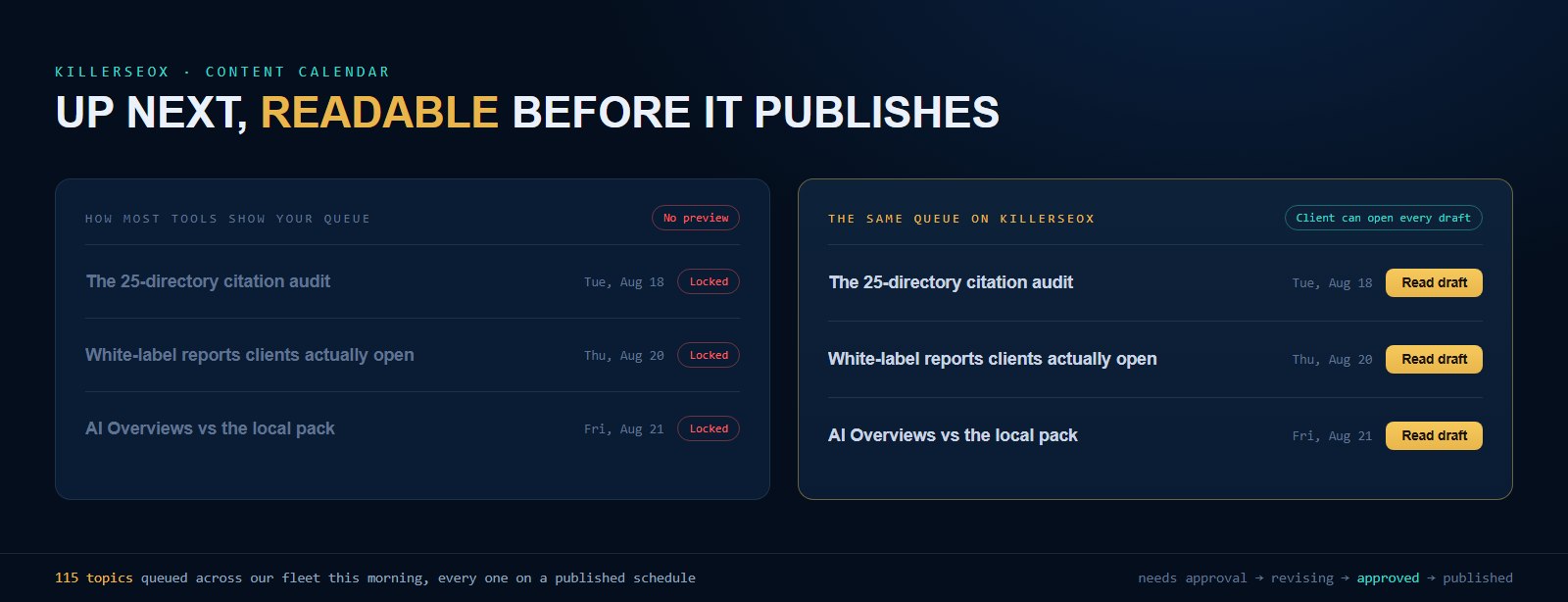
In July, a client was scrolling the content calendar on our dashboard. Four posts sat under "Up next," each with a title and a publish date. He asked a completely fair question: can I read them? That day, the honest answer was no. The titles were there. The dates were there. The drafts were not openable. We shipped the fix the same week, and the question stuck with me, because in most of this industry the client never even sees the titles.
Blog content is the one deliverable in this industry that routinely publishes to a client's own website without the client ever seeing it. Nobody would accept that for a logo, an ad, or a mailer. For blog posts it is somehow normal. This post is about the workflow that fixes it: what the statuses should be, who holds which switch, and how to add review without strangling the publishing schedule that makes a blog work in the first place.
- Most content services show you a blog post for the first time after it is live on your own website. The fix is a calendar where every queued post has a title, a date, and a readable draft.
- A working content approval workflow is four statuses (needs approval, revising, approved, published) plus one client-level switch: auto publish.
- Approving a topic and approving a final draft are two different permissions. A cleared subject is not permission to ship an unread post.
- Approval kills cadence only when it is a toll booth. The durable default: publish on schedule, keep drafts readable ahead of time, and hold a post only when someone objects.
- A draft review is a five-minute truth check on prices, claims, services, and towns. It is not an edit pass, and it should never be done by email.
Why can't you read your own blog posts before they go live?
Because most content services are built around their own production line, not your visibility. Drafts live in a writer's queue, a Google Doc, or a ticket system you never see. So the first time most owners read a post is after it is already published on their own website.
There are two standard setups out there, and both are broken in opposite directions.
The first is the content mill. Posts appear on your site on a schedule, and you find out what they said when a customer mentions one. I have watched owners discover a post quoting a price they stopped charging in 2024, and a post cheerfully offering a service the business does not sell. Nobody meant harm. The workflow just had no step where the owner's eyes were possible, let alone required.
The second is the approval chain. Every post needs a sign-off, drafts arrive as email attachments, and the whole schedule waits on the busiest person in the building. The content is safer. It is also barely getting published, and a blog that publishes twice a quarter is not a blog, it is a liability line item.
I would love to tell you we had this perfectly solved from day one. We did not. Our dashboard listed every upcoming post with its title and date, which already beat most of the market, and then a client asked to actually read one and I realized a title and a date is a promise, not proof. Within the week, every draft written ahead of its publish date became fully readable on the dashboard: a "Read draft" button next to the queued post, the complete text behind it. The build took days. The reason it did not exist sooner is the same reason it barely exists anywhere: the production side never needs it. Only the client does.
What should a content approval workflow actually look like?
Four statuses and one switch. Every topic moves through needs approval, revising, approved, and published, and you can see the whole board at any time. On top sits a client-level auto publish switch: topic approval clears a subject to be written, auto publish decides whether the final draft can go live without your eyes on it.
The statuses are the easy part. Every post idea enters the calendar as a titled topic with a projected date, and it wears exactly one label: needs approval (waiting on you), revising (you flagged something), approved (cleared to write), or published (live, with the link). One glance at the board tells you where everything stands. One real client board this morning: 6 topics approved, 0 waiting on approval, 18 published. Reading that took a glance, not a meeting.
The part most tools get wrong is collapsing two different permissions into one. Approving a topic means "yes, write about that." It does not mean "publish whatever comes back without showing me." Those are separate decisions, so they get separate controls: the per-topic status handles the first, and a client-level auto publish switch handles the second. Auto publish on means approved topics get written and go live on schedule. Auto publish off means the finished draft sits readable in your calendar and waits for a human yes.
Both gates have to pass before anything touches your site. That sounds bureaucratic and is the opposite: because the rules are explicit, nobody has to hover. Across our fleet this morning there are 115 topics sitting in queues, every one visible with its projected date, every one governed by those same two switches. No surprises in either direction.
Does an approval step kill your publishing cadence?
Only if approval is a toll booth. The workflow that survives a busy owner: publish on schedule by default, keep every draft readable ahead of its date, and hold a post only when someone actually objects. A schedule that waits for a weekly yes from a business owner dies within a month.
Here is the failure I have watched over and over. An agency, trying to do the right thing, emails a draft: "Let us know your thoughts!" The owner is running a business. The email ages. The post behind it waits, and the post behind that one. Six weeks later the blog has published once and the agency is chasing sign-offs like unpaid invoices. Review did not make the content better. It made the content stop.
The mechanics matter more than the intention. Batch the decisions at the topic level, where approving a quarter's subjects takes ten minutes, and keep the per-post gate optional. One roofing client of ours has 18 topics approved, and every Friday slot into December already has its subject assigned. He cleared those in batches, and his drafts sit readable ahead of each date. Consistency like that is a ranking asset you cannot buy retroactively, which is why the action engine treats a stalled content queue as a problem to flag, not a preference to respect.
For owners who want a hard gate anyway, auto publish off gives them one, and the readable draft makes it cheap: the post is finished and sitting in the calendar days early, so the review can happen Tuesday night at the kitchen table instead of in a Friday email scramble. Silence keeps the schedule. Objection stops the post. That is the right default for a working business.
Want a blog schedule you can actually see?
The free audit reads your rankings and AI visibility in about 60 seconds, no card and no signup. It will also tell you whether your current blog is helping or just existing.
Run my free auditWhat should you check in a five-minute draft review?
Facts, names, and promises. Verify prices and claims, confirm the post only offers services you sell and towns you serve, check the byline and the photo, and read the call to action as a commitment you will have to honor. Skip the wordsmithing entirely. A draft review is a truth check, not an edit pass.
When a client opens a draft, this is the checklist I actually want them running:
- Numbers and claims. Prices, timelines, warranty terms, "family owned since." You are the only person in the chain who knows when one of these quietly changed.
- Services and service area. Does the post promise anything you do not sell, or name a town you will not drive to? This is the single most common real catch.
- The byline. Posts on your site should carry a real person from your business, because that name is an accountability signal to readers and to Google. It is a hard rule on every site we touch.
- The photo. Right trade, right region, right season. A snow-covered roof on a Florida contractor's blog costs credibility with every local who sees it.
- The commitment. If the post ends with "call for a free estimate," that is now a thing you owe people. Make sure you mean it.
Notice what is not on the list: sentence style. If a draft is competently written, resist rewriting it into how you would have phrased it. That path leads back to the toll booth. And the structural work that makes a post extractable by search engines and AI assistants (the takeaways box, the direct answers, the schema behind the page) should already be built into the template, not something you inspect per post. I walked through that whole layer in the AIO on-page checklist.
How do agencies keep client approvals from eating the week?
A share link that opens without a login, statuses that batch decisions instead of scattering them across email, and a per-client auto publish switch. The client reads drafts on their own time and flags the rare problem. Nobody attaches Word documents, and nobody spends Friday chasing sign-offs.
If you run content for twenty clients, approval by email is a part-time job you never invoiced for. Twenty threads, twenty "just following up on this," twenty versions of a draft floating around with tracked changes. The clients are not being difficult. The medium is.
The version that scales is embarrassingly simple: every client gets a link. It opens their calendar, their statuses, and every readable draft, with no login prompt in the way, and under your brand if you are running white label. A login prompt sounds like a small thing until you watch how many reviews simply never happen behind one. A plain link gets opened from a phone in a truck between jobs, which is where most of your clients actually live.
Then let each client pick their own gate. Some want eyes on every post forever, and that is fine: their drafts hold until they tap approve. Most review everything for a month, watch the drafts keep passing, and flip auto publish on. Either way the schedule belongs to the system instead of to the slowest inbox, and your team's week goes back to work someone pays for. That workflow ships on the agency plans, and honestly, the fastest way to judge it is to look at ours: the topic and date for this very post sat visible in our own public calendar for the last two weeks, and the next four posts are sitting there now. If you want the same setup for your own site or your clients, a free account is where it starts.
Quick answers
What happens if I never approve a queued post?
Can I request changes to a draft instead of approving it?
Should every blog post require my approval before it publishes?
Can my clients read drafts without logging into anything?