SEO Audit Example: One Real Report, Line by Line
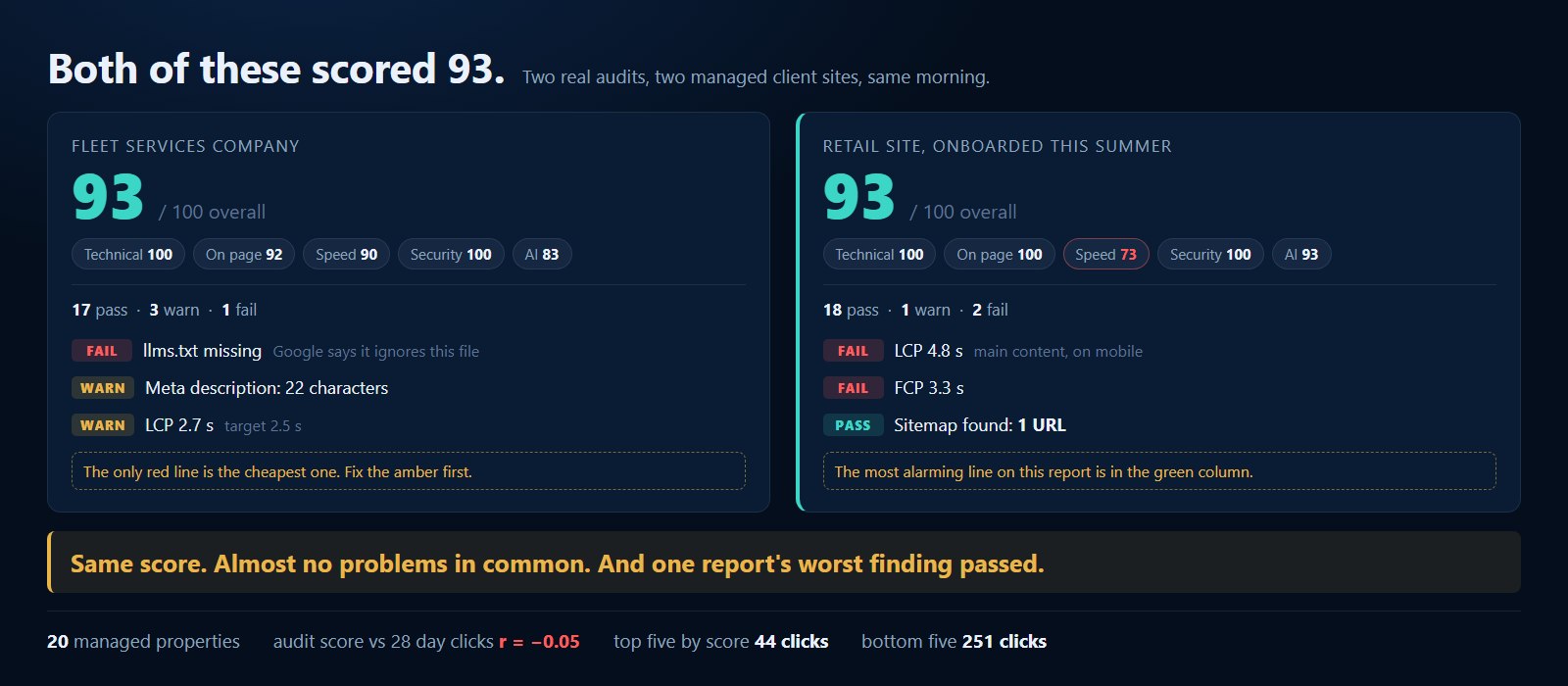
Two of the sites we manage scored exactly 93 on their last audit. One of them takes 4.8 seconds to paint its main content on mobile. The other has a sitemap with a single URL in it, and our own report marked that line as a pass.
Both reports are accurate. Neither 93 means what it appears to mean when it lands in a client email with a green badge next to it. And the SERP for this query is not much help, because almost everything ranking is a slide deck, a template download or a report generator. Plenty of examples of what an audit looks like. Almost nothing on how to read one.
So here is a real report, check by check, with the lines worth acting on separated from the lines worth noting. Then the uncomfortable number I pulled across all twenty properties on our platform this morning. No client is named.
- An audit score is a hygiene measurement, not a performance forecast. Across the twenty properties on our platform with both an audit and 28 days of click data, the correlation between audit score and clicks is r = -0.05. That is zero with a rounding error.
- Two of our managed sites both score 93 and share almost none of the same problems. One loses its points on content depth and AI readiness. The other has a perfect on page score and loses 27 points on load speed alone.
- Read the detail column, never the status label. A sitemap containing one URL passed. A 22 character meta description was filed as a warning. The labels rank severity, not commercial urgency.
- The five highest scoring sites on our book averaged 44 clicks over 28 days. The five lowest averaged 251. Audit scores do not rank your book of business.
- Send a client three specific findings, not twenty one. Three that are true and fixable is an exhibit. Twenty one is homework you just assigned them.
What does a real SEO audit report actually look like?
Twenty one checks across five categories: technical, on page, speed, security and AI readiness. Each one returns pass, warn or fail with a line of detail underneath. The report below belongs to a fleet services client. It scored 93 overall, with 17 passes, 3 warnings and a single failure. It reads clean, and the clean read is the problem.
Here are the category scores exactly as they came back.
The seventeen passes are the boring part, and boring is correct. Valid SSL. A reachable robots.txt. A sitemap with 42 URLs in it. A viewport tag. A canonical pointing at the right URL. Server response in 176 milliseconds, which is genuinely quick. One H1 on the page. A title tag at 50 characters. Alt text on all seven images. LocalBusiness, WebSite, BreadcrumbList, FAQPage and WebPage schema all present. Layout shift at 0.038 and total blocking time at 160 milliseconds. A mobile PageSpeed score of 90.
That is a technically healthy site, and if you stopped reading there you would tell the client so. The three warnings and the one failure are where the report earns its keep:
- Meta description, warning. 22 characters. The recommended range is 150 to 160.
- Largest Contentful Paint, warning. 2.7 seconds against a 2.5 second target.
- First Contentful Paint, warning. 2.7 seconds.
- llms.txt, failure. The file is absent. This is the only red line on the report.
Which lines should you act on first?
The lines that change what a searcher sees or whether a page can be found at all. On this report that is the 22 character meta description, which is filed as a warning. The single failure, the missing llms.txt file, is the least commercially urgent item on the page. The colour coding and the priority order do not match.
A 22 character meta description means Google is writing that snippet for you, every time, from whatever text it decides fits the query. Sometimes that is fine. Often it is a nav label and a phone number. It is the one item on this report that directly changes what a human sees before deciding whether to click, it takes about four minutes to fix, and it is the same colour as a load time that is two tenths of a second over target.
Then the failure, and I am going to argue against our own report here. llms.txt is a proposed convention for declaring your content to language models. Bing, Perplexity and ChatGPT will fetch it. Google has stated plainly that it does not use llms.txt in Search. So a missing llms.txt is worth ten minutes of somebody's afternoon and it is not an emergency, which is exactly what the only red line on a client report implies it is.
I would rather the tool underweighted that check, and we will probably change it. But the deeper point survives any tool's weighting: severity labels describe how confidently a check can be evaluated, not how much money the finding is worth. That judgment is the part you are paid for, and it is the part no scanner performs. The checks themselves are covered in the SEO audit checklist, and how to run this repeatably under your own brand is in the white label SEO audit tool post.
Why did two sites with the same score have nothing in common?
Because 93 is an average of five category scores and there are many routes to it. The fleet services site has fast pages and lost its points on content depth and AI readiness. The retail site has a perfect on page score and lost 27 points on speed alone. Identical numbers, opposite work orders.
The second site is a retail account we onboarded this summer. It also scored 93, with 18 passes, one warning and two failures. Both failures are speed.
Everything the first site got a warning for, the second site passed outright. Its meta description is 152 characters. Its title is 57. Layout shift is a flat zero and total blocking time is zero milliseconds. It has llms.txt in place, which was the other site's only failure. And its main content takes 4.8 seconds to appear on a phone, which on a retail site is the whole ballgame.
Two reports, one number, and a month of work that overlaps almost nowhere. This is the argument against ever leading a client conversation with the score. The score is a summary of things that are easy to count. What you actually need from an audit is the list, and you need somebody to rank the list.
When should a passing check worry you?
When the check tested existence and you needed it to test adequacy. On the retail site our report reads sitemap found at /sitemap-index.xml with 1 URL indexed, and marks it a pass. One URL is the most important finding in that entire report, and it is sitting in the green column.
The check asks whether a sitemap is present and parseable. It is, so it passes. Nothing in the logic asks whether the number of URLs inside it is plausible for the site. The fleet services sitemap declared 42 URLs. This one declares one, which means every other page on that site is being discovered by crawl alone, or not at all.
Two more passes on these reports deserve the same suspicion. Content depth passed at 996 words, which is a pass and is also thin for a commercial page. Image alt text passed because all nine images have some alt text, and the check has no opinion at all about whether that text is any good. I have seen alt text read image1 across an entire site and pass this line every time.
None of that makes the checks wrong. They are doing what they say. It does mean the green column is not a section you skim, which is the opposite of how every audit report gets read, including by us. If you want to see this on your own site before you trust anyone's summary of it, the free audit runs in about a minute with no card and no signup.
Does the audit score predict traffic?
No. Across the twenty properties on our platform with both an audit on file and 28 days of click data, the correlation between audit score and clicks is r = -0.05. The five highest scoring sites averaged 44 clicks in that window. The five lowest averaged 251. The score describes whether a site is able to compete, not whether it does.
I ran this expecting a weak positive relationship and got nothing. Scores on our book run from 65 to 94 with a median of 87. Plotted against 28 day clicks, Pearson comes out at -0.045 and Spearman at -0.13. In practice that is a flat line.
The specifics are blunter than the coefficient. Three of our sites score 93. Over the same 28 days they produced 27 clicks, 36 clicks and 4 clicks. The lowest scoring real account on the book, an 83, produced 482. An 87 produced 2,256.
Now the honest part, because this number is easy to misuse in both directions. Clicks are driven overwhelmingly by how old a domain is, how much authority it has and how much demand exists for what it sells. Our highest scoring sites include some of our newest accounts, and our biggest traffic sites are older properties carrying years of content and links. That confound is doing most of the work here, and with twenty properties I would not publish a correlation this size as a finding about the world.
What it is strong enough to settle is narrower and more useful: the audit score is not a performance metric and must never be reported as one. An 89 that does not move is not a broken promise if nobody ever claimed the 89 was the point. I made this argument in one line inside the SEO proposal post. This is the version with the numbers behind it.
The metrics that do move with commercial outcomes are the ones you have to measure over time rather than scan once: tracked positions across desktop, mobile and Maps, which is what a local rank tracker exists to do, plus impressions and clicks from Search Console and mention rate across the AI models. An audit is the first appointment. It is not the chart.
Can ChatGPT do an SEO audit?
It can critique a page you paste into it, and it is good at that. It cannot measure your Largest Contentful Paint, fetch your robots.txt, count the URLs in your sitemap or tell you what your competitors rank for. Use a model for judgment on the findings. Use a crawler to produce them.
This question sits in People Also Ask for nearly every audit query now, so it is worth answering properly. An audit is two jobs. The first is measurement, which needs something that fetches your pages, runs a performance test and parses what came back. A chat model in a browser tab does none of that, and when asked anyway it will produce confident numbers that are not readings.
The second job is interpretation, and that is genuinely the part models are good at. Everything in this post after the word 93 is interpretation. Paste a real report into a model and ask which three lines would change revenue, and you will get a useful answer. Ask it what your LCP is and you will get a plausible one.
What should an SEO audit cost?
Nothing, when you are using it to open a conversation. The automated pass that produced both reports in this post costs a PageSpeed call and a handful of fetches. Charge for the interpretation and the repairs. On our partner pricing the software is $29 per site per month and you set your own retail number.
Agencies still quote a few hundred dollars for a one off audit, and some earn it, because a senior person spending half a day inside Search Console and a crawl will find things no scanner does. What is no longer defensible is charging for the scan itself. It is a commodity, it is instant, and your prospect can get one free from four vendors before lunch.
So give it away and charge for the next part. Our published numbers, read off the pricing page this morning: white label SEO software at $29 per site per month with the retail price yours to set, or fulfillment at $99, $198 and $349 per site per month for Local, Growth and Nationwide, every plan including the whole platform, month to month, with a seven day trial. Done For You service starts at $997 a month. The margin math on reselling that is worked through in the per client pricing post, and the other genuinely free tools are listed in what is actually free.
The short version
How I would read any audit report handed to me, in order.
- Skip the overall score. It is an average of five things and it hides which five.
- Read the failures, then argue with them. A red label means a check evaluated cleanly, not that the finding is expensive.
- Read the warnings properly. This is where titles, descriptions and near miss load times live, which is where most of the recoverable clicks are.
- Read the green column for numbers, not for labels. A sitemap with one URL passes. So does 996 words and so does alt text that says image1.
- Pick three findings. Specific, verifiable, fixable this month.
- Never report the score as progress. Report the three fixes, then report positions, clicks and AI mentions over time.
If you want to do this on a real site in the next few minutes, run the free audit and read the detail column rather than the number at the top, or start on the free tier and keep the report next to the tracking so you can watch whether fixing the list actually moved anything. That comparison, over a quarter, teaches you more about which checks matter than any checklist including mine.
Quick answers
What is an SEO audit?
How do you perform an SEO audit?
Can ChatGPT do an SEO audit?
How much does an SEO audit cost?
Is a high SEO audit score good?