Do Google Business Profile Posts Help Your Rankings?
Somebody told you to post on your Google Business Profile every week because it helps you rank. Maybe it was an agency. Maybe it was a video. The advice is everywhere, and almost nobody who gives it has ever lined up the posts against the rankings.
So I did. This morning I pulled the post history for four local profiles we work with, 339 posts in all, and set the June through September stretch next to the weekly Maps rankings our tracker records for the same businesses. A roofer, a pool retailer, a home improvement contractor and a wildlife control company. What came back is not what the "post weekly to rank" crowd would expect, and one profile turned up a problem that had quietly eaten 41 posts.
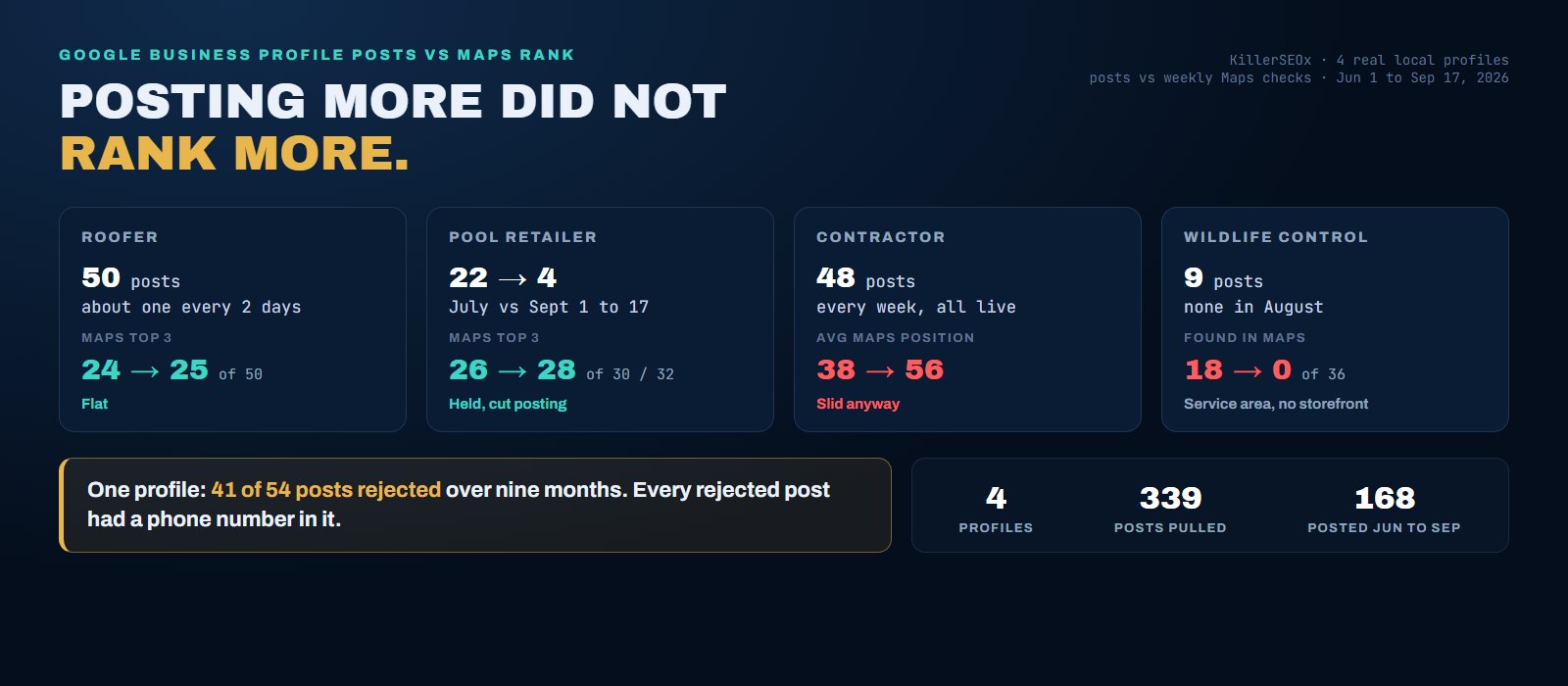
- Posting frequency did not show up in Maps rankings. A roofer posting about every two days sat at 24 of 50 keywords in the top three in July and 25 of 50 in September.
- A pool retailer cut its posting from 22 posts in July to 4 in the first half of September, and its Maps rankings held or improved: 26 of 30 keywords in the top three became 28 of 32.
- A contractor that posted every week all summer, every post live, slid from an average Maps position of 38 to 56 on the keywords it was found for.
- One profile had 41 of 54 posts rejected over nine months. Every rejected post had a phone number in the text. Check the status of your posts, not just that they were sent.
- Posts are for the customer already looking at your profile. Post weekly for that reason, and fix distance, categories and reviews if your goal is rank.
Do Google Business Profile posts help rankings?
Not in any way we can measure. Google's own local ranking guidance names relevance, distance and prominence, and it does not name posts. Across four profiles and 168 posts this summer, Maps rankings held, rose and fell with no pattern tied to how often each business posted. Post for customers, not for rank.
Google is fairly open about local ranking. Its help page for Business Profiles says results are based mainly on relevance, distance and prominence. Relevance is how well your profile matches the search. Distance is how far you are from the searcher. Prominence is how well known you are, which Google says draws on reviews, links and what it finds about you across the web. Complete and accurate profile information shows up in that advice. A weekly posting habit does not.
That does not prove posts count for zero. Google does not publish its full recipe, and plenty of smart local SEO people believe fresh activity on a profile helps a little. I am not going to tell you they are wrong. I am going to tell you that when we went looking for the effect in our own tracking, we could not find it, and I would rather show you the numbers than repeat the rumor.
What happened to Maps rankings while four businesses posted 168 times?
Nothing that lined up with posting. The steadiest poster held steady. The business that cut posting the most held steady too, and even improved slightly. The one that posted every week without a miss lost ground. The only profile that went quiet and also vanished from Maps has a better explanation than posting.
Here is the setup. For each profile I pulled every post Google holds, with its date and its status. Then I pulled our weekly Maps checks for the same business, which run from the business location every week on the same keyword set. Here is June 1 through September 17, side by side.
Start with the roofer, because it is the one the posting advice was written for. It posted like clockwork: 7 posts in June, 19 in July, 14 in August, 10 in the first seventeen days of September, every one with a photo. Its Maps top three count across our weekly checks from August 10 to September 14 read 24, 24, 24, 23, 24, 25. That is a flat line. The posting was relentless and the rankings did not care.
The pool retailer ran the experiment in the other direction. It posted 20 times in June and 22 in July, then slowed to 15 in August and 4 in the first half of September. If posting held up rankings, this is where you would see the sag. Instead its Maps top three held between 25 and 28 every single week, and its average Maps position went from 2.0 to 1.7. It posts less now and ranks slightly better.
The contractor is the uncomfortable one. It posted every week of the summer, and since June every post went live. Its Maps visibility still slid. On the 100 keywords we track for it, it was found in Maps for 8 on August 3 and 7 on September 14, and its average position on those went from 38.3 to 55.6. It never held a top three spot all summer. Weekly posting did not stop the slide, because weekly posting was never what decided its position.
Then there is the wildlife control company, and I am including it because leaving it out would be cherry picking. It posted 4 times in June, 4 in July, none in August and once in September. On July 10 our tracker found it in Maps for 18 of its 36 keywords. The next Maps check ran August 31 and found it for none, and it is still at none. On its face that looks like the proof the posting crowd wants.
I do not read it that way. It posted just as lightly in June and July, when it was found for half its keywords. It is a service area business with no storefront, and service area businesses live and die on distance, which we walked through in service area business SEO. And our checks have a seven week gap in the middle, so I cannot tell you the week it disappeared. It is on our list to diagnose. I would not bet a posting budget on it.
One honest caveat for the whole section. Four profiles over one summer is a field report, not a controlled study. What it does show is that in real accounts, the effect of posting on Maps rank is small enough to be buried under everything else, and "everything else" is where the money should go.
Why did 41 of one contractor's posts never go live?
Google rejected them, and the business kept posting anyway because the posts looked sent. Between September 2025 and early June 2026, 41 of the contractor's 54 posts were rejected. Every rejected post had a phone number in its text. Since June the posts mostly leave the number out, and all 46 have gone live.
This was the most useful thing the pull turned up, and it has nothing to do with rankings. Every post Google holds carries a status: live, processing, or rejected. When I sorted the contractor's history by status, most of a year came back rejected. Halloween roof tips, a spring gutter promotion, a $99 inspection package, a free patio offer. Nine months of real marketing work that no customer ever saw on the profile.
All 41 rejected posts had a phone number written into the text. Only 7 of the 46 posts since June do, and all 46 are live. That makes the phone number the prime suspect. I will not call it the proven cause, because the other two profiles muddy it: the roofer has 31 live posts with a phone number in them and the pool retailer has 55. Google enforces its post rules unevenly and rarely says which rule a post broke.
The practical lesson is simple. After you post, go back a day later and confirm it is live. If you post through a scheduler, check the status in the scheduler or on the profile itself. We made a house rule out of this: no phone number in the post text, because the profile already carries a call button and it is not worth risking the post over a number the customer can already tap.
How often should you post on Google Business Profile?
Once a week is plenty, and consistency matters more than volume. Our roofer posted every two days and ranked no better for it. Weekly gives a customer who checks your profile something recent to read, costs about ten minutes, and leaves your time for the work that actually moves rank.
The roofer's data answers the frequency question better than any opinion could. Posting at a pace of about 170 posts a year bought it nothing in Maps that the pool retailer did not get while it was cutting back. More posts is more work, not more rank.
So why post weekly and not monthly? Because the reader of your posts is a person, and that person is deciding between you and two other businesses in the pack. A profile whose newest update is from last spring reads like a business that might not answer the phone. One that posted this week reads like a business that is open and working. That is a conversion argument, and it is a good one. It just is not a ranking argument.
A weekly rhythm also fits how we already work. Every local client of ours gets a new blog post on a schedule, and the weekly profile post promotes the newest one. The content already exists, so the post takes minutes, not an afternoon.
If posts do not move rank, what are they for?
They are for the customer who has already found you. Posts sit on your profile where searchers compare you with the other businesses in the pack. A current offer, a recent job photo or a useful tip can be the difference between a call and a scroll. Think of posts as a shop window, not a ranking lever.
Look at what the Maps pack actually does. It puts three businesses in front of someone who is ready to buy. Whatever got you into those three is ranking. Whatever happens next is selling. Your stars, your review count, your photos and your recent posts all do their work in that second moment, which is the same split we found with Google reviews and local rankings: reviews get you picked more than they get you ranked.
That makes posts worth doing well, just for a different reason than you were sold. A post that shows a finished job in a named town, with a clear next step, is doing sales work. A post stuffed with hashtags and a phone number is doing neither sales work nor ranking work, and on one of our profiles it was not even visible.
Find out what is really holding your rankings back
Run the free KillerSEOx audit on your own site. About 60 seconds, no card, no trial clock.
Run my free auditWhat should a Google Business Profile post include?
One real photo, a few sentences about one specific thing, the town you did it in, and a link to where the customer can learn more. Leave out the phone number, since the profile already has a call button. Leave out hashtags too. Then check a day later that the post actually went live.
Here is the format we use for local clients, and why each piece is there.
- One real photo. Every post on all four profiles carried a photo. Use your own job photos, never stock, and never the same photo twice.
- One subject. A post that covers roofing, siding, windows and a holiday special is covering nothing. Pick the one thing and say it plainly.
- The town. Name where the work happened. It tells a local customer you work near them, and it reads like a real business instead of a template.
- A link to something worth reading. Our weekly post points at the client's newest blog post, written into the text so it survives any tool. That turns a profile glance into a site visit.
- No phone number, no hashtags. The call button already exists. Hashtags come from social media habits and do nothing we can see on a Business Profile.
- A status check. Confirm it is live the next day. Forty one rejected posts is what skipping this step costs.
Keep it short. Just over half of the 339 posts we pulled ran under 300 characters, and that is about right. Someone comparing three businesses on a phone reads the first line and decides.
What actually moves your Maps ranking?
Distance from the searcher, how well your profile and site match the search, and prominence, which leans on reviews and your presence across the web. You cannot move your address, so the work is your primary category, service and town content on your site, reviews, and accurate citations, measured from more than one spot.
The pool retailer is the cleanest example in this whole pull. It holds the top three for 28 of its 32 tracked keywords. It got there with a strong category match, a location near its customers, and more reviews than anyone around it. Its posting fell off in September and nothing moved, because none of those things changed.
The contractor that slid despite weekly posts shows the other side. The fix for it is not a better post. It is finding out where it drops out of the pack and why, which starts with checking from more than one point on the map instead of one. We showed how different those readings can be in grid heatmaps versus a single Maps position.
If you want to know which of these is holding you back, here is the order I would work in.
- Track Maps separately from organic. A local rank tracker should show desktop, mobile and Maps side by side, weekly, so you can see a slide like the contractor's while it is still small.
- Check your citations. A wrong phone number or old address on major directories muddies the prominence signal. Our local citation audit covers what consistency is actually worth.
- Close any real review gap against the businesses beating you close to your customers, not against a franchise across the metro.
- Then post weekly, for the people who find you once the rest is working.
And do not panic over one bad week. Maps readings move around, which is why we laid out how often to check your rankings before anyone reacts to a single number. Post because your customers read your profile. Rank because you fixed what Google says it weighs. Start with the free audit on your site, or put your business on the free tier and watch your own Maps rankings every week.
Quick answers
Can you put a phone number in a Google Business Profile post?
Why was my Google Business Profile post rejected?
Can you schedule Google Business Profile posts?
Do hashtags help Google Business Profile posts?
What types of Google Business Profile posts are there?