Multi Location SEO: One Number Cannot Cover Two Markets
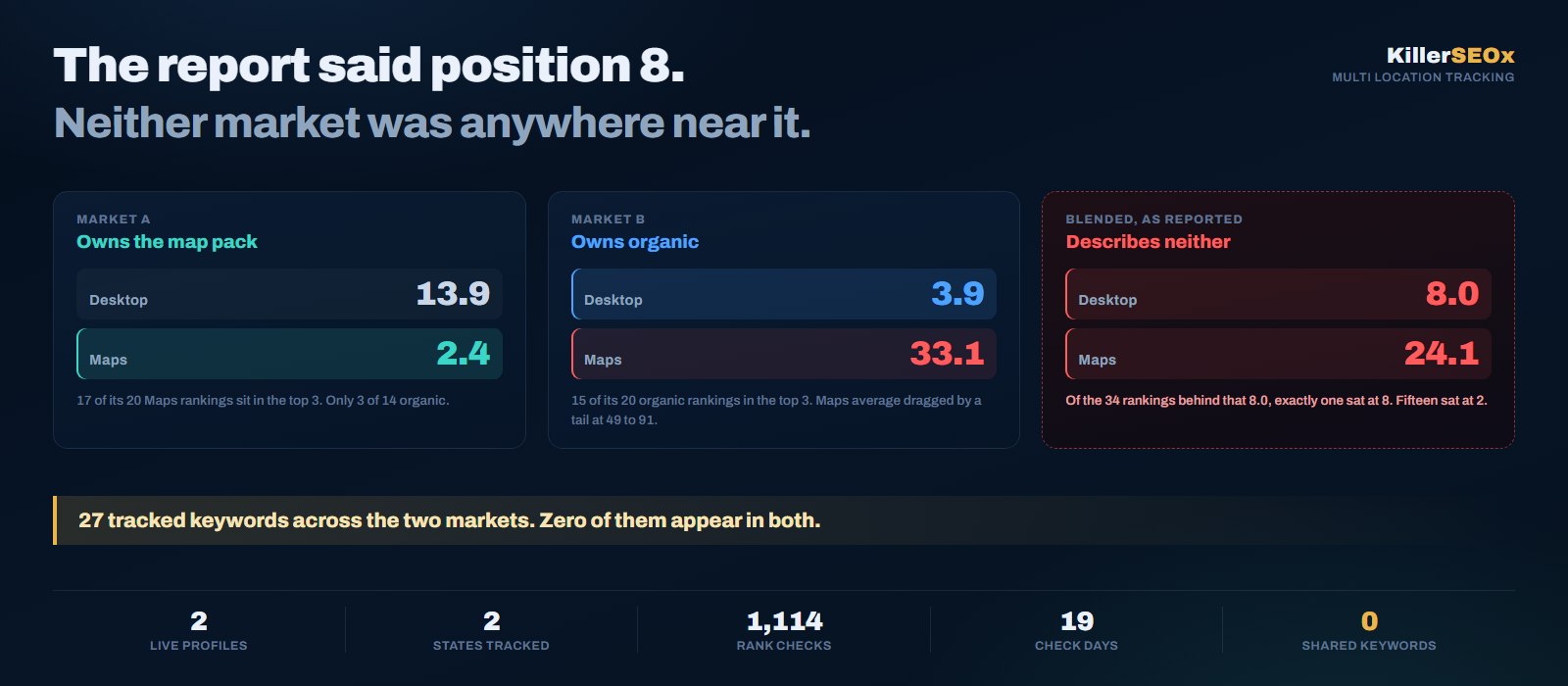
One of the asphalt clients on our platform reports an average desktop position of 8.0. It has two markets tracked. One sits at 3.9, the other at 13.9. Of the 34 rankings that produced the 8.0, exactly one was at position 8 and fifteen were at position 2. The average is the thin spot between two markets that have almost nothing to do with each other.
Multi location work breaks your reporting long before it breaks anyone's rankings. The rankings are usually fine. What goes wrong is that every tool you own was built to answer one question about one business, so it hands you one number, and that number quietly averages two or five or twelve local campaigns into a figure that describes none of them. Then you put it in a client email.
So here is the setup and the reporting, written for whoever has to run it. The data underneath comes from the two multi location accounts on our own platform, pulled this morning, no client named. Including the part where I compared our own tracking against our own client profiles and found that on both accounts the two did not match.
- A blended ranking average across locations is arithmetically correct and operationally useless. Our asphalt client averages desktop position 8.0 across 101 checks. Split by market it is 3.9 and 13.9, and of the 34 rankings behind the average exactly one was at position 8.
- The two markets are near mirror images. One averages 2.4 in Maps and 13.9 in organic. The other averages 3.9 in organic and 33.1 in Maps. Report either number alone and you describe the opposite business.
- Audit the footprint before the rankings. Put the list of live Google Business Profiles next to the list of locations your tracker checks from. On both of our own multi location accounts those lists disagreed, and nobody had noticed.
- The location you check from is the question, not a setting. The same roofing keyword in the same week sits at number 2 in Maps checked from its own town and at 15, found once in seven checks, checked nationally.
- One profile per staffed address, each with its own phone number, its own landing page and its own primary category. Two branches of one of our clients carry 377 reviews and 41 reviews. They are not one business to Google and they should not be one line in a report.
What is multi location SEO, and how is it different from a service area business?
Multi location SEO is ranking one brand at several real addresses, where each address has its own Google Business Profile, its own review profile and its own set of local competitors. A service area business has one address and many towns. The first is several local campaigns sharing a domain. The second is one campaign with a wide radius.
Settle it in the kickoff call rather than month three. Ask one question: does this address have people at it who serve customers. If yes, it is a location. If it is a registered agent, a storage unit or a mailbox, it is not, and treating it as one will eventually cost you a profile suspension.
The distinction matters because the two cases fail in opposite directions. A service area business has one profile reaching outward, and its problem is the far edge of the radius going dark. We took that apart with real tracker data in the post on service area business SEO, where a wildlife control client held positions 2 to 5 in close suburbs and 70 to 94 at the radius edge. A multi location business has the reverse problem. Each profile is strong at home, and the reporting loses the thread.
Why does a blended average describe neither location?
Because averaging requires the things being averaged to be comparable, and two local markets are not. Across 101 desktop checks our asphalt client averages 8.0. One market sits at 3.9, the other at 13.9. Of the 34 rankings behind that average, exactly one was actually at position 8. Fifteen were at position 2.
Here is the whole picture from one client, four weeks of checks through 28 September. Two markets, same brand, same website, 27 tracked keywords between them.
Read those three lines in order and watch the information disappear. The two markets are near mirror images. Market A is strong in the map pack and middling in organic, with only 3 of its 14 organic rankings in the top 3. Market B is the reverse. Those are two different jobs for next quarter, and the blended row recommends neither.
Then the part that makes the blend worse than imprecise. The two markets share no keywords at all. Seventeen terms are tracked in one and ten in the other, and not one appears in both. So the blended 8.0 is not averaging the same question asked in two places. It is averaging two different questionnaires and printing the result as one score.
Per location averages deserve the same suspicion. Market B's Maps average of 33.1 looks like a failing branch. It is not. Its core terms sit at number 1 on the most recent check, and the average is dragged down by a tail of commercial asphalt phrases at 49, 55, 70, 78 and 91. Both readings are true, which is the trap we pulled apart in the post on what average position actually means. Every summary throws something away. Know what.
How do you check that your tracking matches the client's real footprint?
List every live Google Business Profile. List every location your tracker checks from. Put the two lists side by side. They should match. On both of the multi location accounts on our own platform they did not match, and nobody had caught it until I ran the comparison to write this post.
I will show you ours, because a worked example going wrong is more useful than me telling you to be careful.
The asphalt client has two live profiles, one in Maryland and one in Florida, about a thousand miles apart. Its rank tracking runs on two state level locations: Maryland and Delaware. Line those up and two things fall out. The Florida profile, which holds 10 reviews at a 5.0 average, has zero tracked keywords pointing at it. And Delaware, which carries 10 tracked keywords, has no profile in it at all.
Neither is a disaster. The Delaware tracking turned out to be genuinely informative, because it is the only place we can see how far the Maryland profile reaches, and it reaches well: Maps positions of 1, 2, 2, 3 and 4 on the pothole terms across the state line, while its organic results there sit at 6, 19 and 27. A useful finding, and not a decision. It was a default that happened to be interesting, and the Florida gap on the other side of the same account was a default that was not.
The roofing client is cleaner and still not matched. Two branches in New Hampshire, 50 tracked keywords over seven location codes: 22 anchored to the first branch's town, 14 at state level, 6 national, 5 in a neighbouring town and one each in three more. Exactly one keyword names the second branch's town, and it is checked from the state centroid rather than the town. So the branch with 377 reviews gets 22 questions asked from its own doorstep, and the branch with 41 reviews gets one asked from forty miles away.
Run it as a table, one row per address: profile live, profile verified, tracked from this location, landing page, primary category, phone, review count. Every blank is either a gap or a decision, and writing it down forces it to become the second.
Does the location you check from change the answer?
Completely, and more than most people expect. One roofing keyword, one week, one business: checked from the branch's own town it holds Maps position 2 and was found in all seven checks. Checked nationally the same keyword averages 15 in Maps and was found once in seven. A second keyword ranks 1 locally and does not appear nationally at all.
This client has two keywords tracked from two location codes at once, which makes it the clean experiment. Same term, same day, same site. The only variable is where the search was run from.
Number 1 in the map pack and simultaneously invisible is not a contradiction. Those are two honest answers to two different questions, and a tracker hands you whichever one it was configured to ask, with no note on the report that a choice was made.
Which is why the geo codes come before the title tags on an inherited account. A national code on local keywords shows you a client who cannot rank. One flagship town code shows you a multi location client winning everywhere. Both look plausible. Our local rank tracker splits desktop, mobile and Maps per location for this reason, and for the map pack a single position is still thin: that argument is in the post on grid heatmaps versus a single Maps position.
How should each location's Google Business Profile be set up?
One profile per staffed address. Each one gets its own local phone number, its own landing page on the site, and a primary category chosen for what that branch actually sells. Shared phone numbers and copied categories are the two mistakes I see most often, and one of our own accounts has both of them.
The roofing client does this properly. Two branches, two profiles, two local numbers, category sets that overlap on roofing and gutters but differ where the branches differ. Each accumulates its own reviews, which is why one sits at 377 reviews and 4.9 stars and the other at 41 and 5.0. To the map pack those are two businesses, not two views of one.
The asphalt client is the counter example from the same book. Both profiles carry the same toll free number, written one way on one and another way on the other. The primary categories differ in a way that reads as accidental rather than chosen, one filed under property maintenance and the other under asphalt contractor, for the same service at both addresses. One has a store code, the other none. None of it is fatal. All of it is drift, and drift is what you are paid to catch.
Two things I would not spend the client's money on. Chasing review counts as a ranking lever, because we tested it across seven managed businesses and the correlation was noise, with the numbers in do Google reviews help SEO. Get reviews because they convert. And a heavy posting cadence on every profile, for the data in the post on Google Business Profile posts. Do both to a reasonable standard per location and put the saved hours into the landing pages.
Does every location need its own page?
Yes, one page per real address, and each one has to earn its URL. Google's spam policies name scaled low value content explicitly, and a location page that swaps a town name into a template is the exact pattern being described. A page carrying that branch's address, hours, staff, photos and finished work is not.
Our bar before a location page ships: real search demand for that town, a hundred words that could only have been written about that place, the branch's own NAP and embedded map, FAQs that differ from the other locations', photos of work done in that market, and a service area claim we can support. If a page cannot clear that, fold the town into a parent page and come back when the branch has something to show.
Never mint a batch. Twelve town pages in an afternoon because the client has twelve towns on a van is how an account lands on the wrong side of a spam update, and it is self inflicted every time. One page, one address, when there is something true to put on it.
What belongs in a multi location client report?
One section per location, each carrying its own organic positions, Maps positions, review count and lead volume. Then a roll up, clearly labeled as a roll up. The owner reads the roll up. The person managing the weaker branch needs their own page, and so does whoever is deciding where next quarter's budget goes.
In a client meeting the blended number is not just uninformative, it is hazardous. A two location business where one branch gains five positions and the other loses five reports as flat. You walk in with nothing to say and walk out having been told something you should have raised first.
Keep the structure boring and repeatable. Same sections, same order, same metrics every month, one page per location, roll up at the front, positions by channel rather than blended. What to include and what to cut is worked through in the post on white label SEO reports, and if you are delivering this across a book of clients the per seat economics are in white label SEO software.
When does a client not need any of this?
When the second address is not a real second market. A mailbox, a storage unit or another suite in the same building is one market with two pins, and tracking it twice buys the client two copies of the same number. Two branches inside one metro often behave as one market as well. Check first, then bill.
I would rather tell a client their two locations are one campaign than sell them two. The test is whether the markets have different competitors in the map pack. If the same five businesses show up for both addresses, you have one market, and the second tracking profile tells you the same thing twice at twice the cost. If the competitor sets barely overlap, you have two campaigns and should price it as two.
Our Delaware setup is the grey middle. No branch there, so by that rule it should not be tracked, and it turned out to be one of the more useful things on the account. So the real rule is not "only track addresses". It is "know why every location on the list is there", which is the thing we had not done.
The short version
Taking on a multi location account this week, in this order.
- Count the real addresses. Staffed and serving customers. Mailboxes will cost you a suspension.
- Run the footprint audit. Profiles on one list, tracked locations on the other, every blank reconciled before you report anything.
- Check the geo codes. A national code on a local keyword and a flagship town code on a twelve branch client produce opposite, equally believable reports.
- Split every metric by location and channel. The mirror image case is invisible otherwise.
- Label the roll up as a roll up. Never let a blended average stand in for a market.
- One page per address, each earning its URL. No batches, no town swapped templates.
To see this on a real account, run the free audit on one location's landing page and then the other, and compare the two reports rather than the two scores. Or start on the free tier, add the same keyword from two different locations, and let it run a month. The gap between those two lines is the whole argument of this post, and it is more persuasive in your client's data than in mine. A Google Maps rank tracker that cannot do that will keep handing you one number for a business that does not have one.
Quick answers
What is multi location SEO?
How many Google Business Profiles should a multi location business have?
Should each location have its own phone number?
Can two locations of the same business compete with each other in search?
How do you track rankings for multiple locations?