White Label Rank Tracker: What to Demand Before You Resell One
The moment you put your logo on a rank tracker, its blind spots become your blind spots. The client does not know a vendor exists. They read the chart, they see your name on it, and they decide whether to keep paying you.
So the question is not which white label rank tracker has the nicest dashboard. It is which one tells the truth about a client's business well enough that you can defend the invoice. I run this across 19 live sites. Over the last four weeks our tracker ran 6,830 checks on 790 keywords, and the data from that pull is the reason this list looks the way it does. Every number below is ours, pulled this morning, with no client named.
- Demand Google Maps as its own tracked surface. In four weeks Maps produced 261 top three finishes against 80 on desktop for the same keywords.
- On 149 keyword days a business held a Maps top three spot while organic showed nothing. An organic only tracker reports those weeks as failure.
- Demand desktop and mobile split apart. Of 983 keyword days where both found the site, 200 differed by five or more positions and 53 by ten or more.
- Demand an honest blank for not ranking. More than half our checks come back not found, and a tool that writes 100 instead of nothing turns a real loss into a fake number.
- Demand a dated history export before you sign. If you cannot take the history with you, every client chart resets to zero the day you switch tools.
What is a white label rank tracker?
A keyword rank tracking tool an agency resells under its own brand. The vendor runs the checking and stores the history; the agency's logo, colors, domain and sending address are what the client sees. The agency sets the retail price and keeps the difference. The vendor's name should not appear on anything the client ever opens.
That is the whole product in one sentence, and it is also where most of the shopping stops. Agencies compare logos, colors and a custom domain, sign up, and find out months later what the tool never checked. The branding is the easy part. Every vendor in this category can put your logo on a report.
What separates them is what the tracker actually looks at, what it does when it finds nothing, and whether you can leave with your data. Those three things decide whether your client renews. So here are the nine questions I would put to any agency rank tracker before my name went on it, in the order they have cost us real money.
Does it track Google Maps, or only organic?
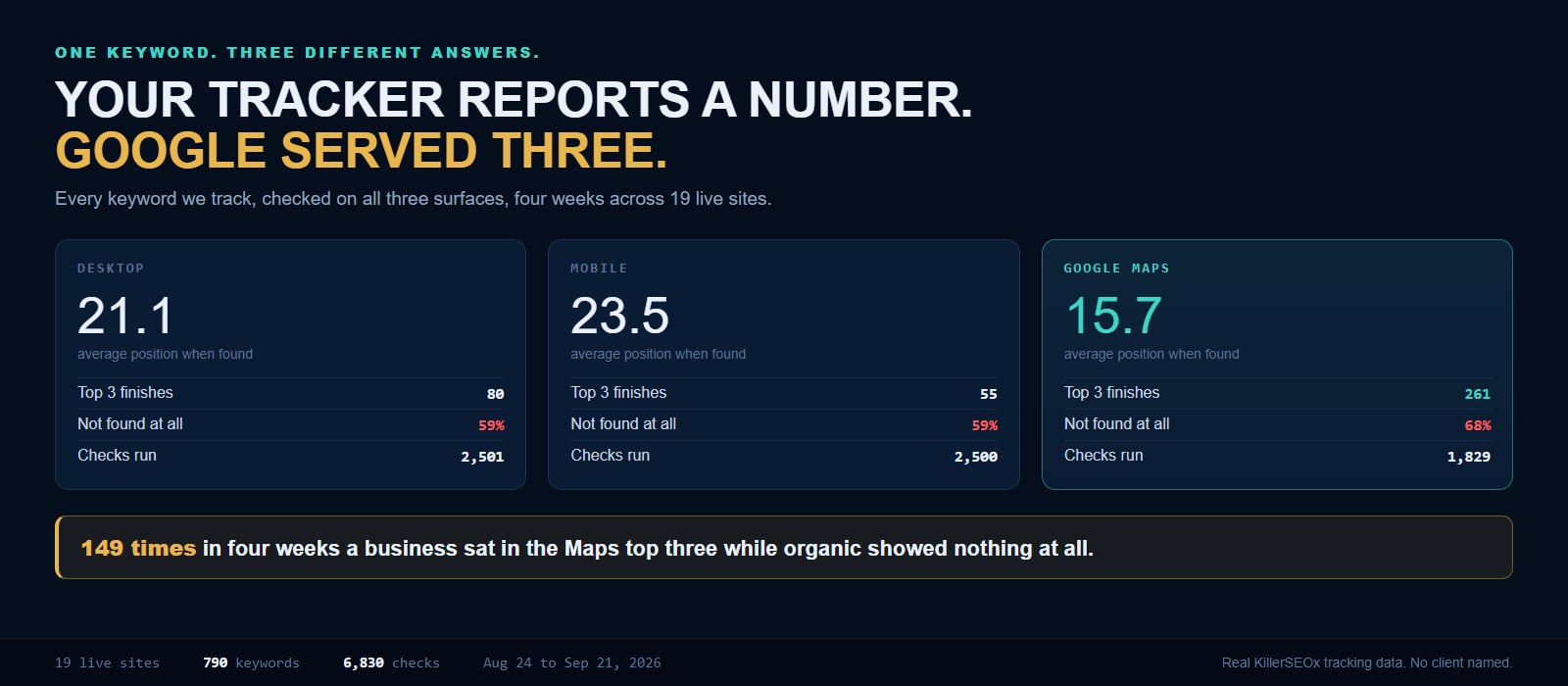
It must track Maps separately for any business with a service area or a storefront. In four weeks of our own tracking, Maps produced 261 top three finishes against 80 on desktop for the same keywords. On 149 keyword days a business sat in the Maps top three while organic showed nothing at all.
This is the first question and it is not close. Look at the same 790 keywords checked three ways over four weeks.
Maps found the business less often overall, and when it found it, it found it much higher. For local service businesses the pack is where the phone call comes from, and it is the surface where the client can realistically win. Track only organic and you will spend a year reporting an average position in the twenties on a business that has been sitting at number two in the map pack the whole time.
The 149 number is the one that should worry you. That is 149 separate keyword days across our fleet where the business held a top three Maps spot while our desktop check either found it past position ten or did not find it at all. Two clients account for most of them. A pool retailer logged 71 of those days, and a roofing contractor 64. In both cases an organic only tracker would have sent a report saying the keyword was not ranking, on a week when the business was in the top three of the box customers actually tap.
Ask the vendor to show you Maps and organic side by side on one screen for one keyword. If the answer involves a second product, a different login, or an upgrade tier, you have your answer. We wrote up how far apart those two readings get in AI Overviews versus the local pack, and why one Maps position is itself an average of many, in grid heatmaps versus a single Maps position.
Does it separate desktop from mobile?
Yes, and it should show both without you asking. Of 983 keyword days in our data where desktop and mobile both found the site, 200 differed by five or more positions and 53 by ten or more. On 47 days mobile found the business and desktop did not. On 33 days it was the other way round.
A tracker that reports one number per keyword picked a device for you and did not mention it. Usually that device is desktop, which is the one your client's customers are least likely to be holding.
One in five of our matched checks disagreed by five spots or more. That is not a rounding error, that is the difference between page one and page two in a client meeting. And the 47 mobile only days are worse than they look: on those days the desktop check came back empty while the business was ranking perfectly well on the device the customer was using. Report the desktop number and you have told your client they are invisible when they are not.
Two practical demands here. The report must label which device each number came from, and the client facing view must let them see both without an export. If a vendor treats mobile as an add on, they are selling you half the search results.
What does it do when your client is not ranking at all?
It should record an honest blank, not a placeholder number. Across our last four weeks, 1,485 of 2,501 desktop checks came back not found. A tracker that writes 100 or 101 into those rows will quietly average them into a position number, and every trend line you show a client after that is fiction.
This one sounds like a technicality and it is the one that breaks reports. Most keywords most of the time are not ranking. Nearly 59 percent of our desktop checks and about 68 percent of our Maps checks find nothing in the depth we check. That is normal, especially in the first months of an account.
What matters is how the tool stores it. If not found becomes 100, then a client whose keywords are genuinely improving can appear to get worse the moment you add ten new target keywords, because ten fresh 100s just dragged the average down. I have watched an agency try to explain that on a call. There is no good version of that conversation.
Demand three things: not found is stored as empty, the average position is calculated only from keywords that were actually found, and the report shows the count of keywords found as its own number next to the average. We took apart why one average can be right and misleading at the same time in what average position in Google Search Console really means.
See what your own tracker is missing
Run the free audit on any site you manage. No card, no trial clock, no call.
Run my free auditDoes it track AI answers as well as blue links?
It should, because an AI answer now sits above the results your tracker measures. Across our fleet the spread is enormous: some accounts score in the high eighties and nineties for AI visibility while others sit at zero on the same kind of checks, and none of that shows up in a rank number.
Rank position was a complete picture when the only thing above the fold was ten blue links. It is not any more. A customer asking an assistant for the best roofer near them gets a short list, and your client is either on it or not, regardless of where they rank.
Our own weekly AI checks make the point. This morning's portfolio shows a national repair contractor at 91 percent, our own agency site at 79, a pet waste removal service at 77, a pool retailer at 53, a roofing contractor at 39, a fleet services company at 29, a salon at 7, and two accounts at a flat zero. Those last two are found in organic search every week. They just never come up when someone asks an assistant.
You do not need a separate AI tool bolted to your reporting stack. You need the same weekly report to carry both, so the client sees one picture. That is what we built into the weekly AI visibility report, and the underlying idea is covered in what AIO is and how AI visibility tracking works.
Can the client see it without you emailing a PDF?
Yes. Every client should have a live link on your domain, with your branding, that they can open any day of the month without asking you for it. A monthly PDF is a snapshot of a moving number, and it arrives on the one day nobody is thinking about SEO.
Every account in our system carries its own share link. The client opens it, sees their own keywords, their own Maps positions and their own AI visibility, and the vendor's name is nowhere on it. Not in the footer, not in the URL, not in the sending address on the email.
That last part is the actual white label test, and it is worth being blunt with a vendor about it. Ask them where their name appears on a client facing surface. The right answer is nowhere. Ask whether the report email sends from your domain. Ask what the client sees if they click the logo. We went through what belongs on that report, and what we deliberately cut, in white label SEO reports clients actually read.
What happens to your history when you switch tools?
In most tools, you lose it. They export a current snapshot rather than the dated history behind it, so every client chart restarts at zero the day you move. Ask for a full dated export in writing before you sign, and test it during the trial rather than during the migration.
Our own store currently holds 24,736 checks on 820 keywords across 54 separate check days going back to the middle of May. That history is not a nice extra. It is the entire evidence base for the retainer. It is what lets you tell a client that the dip they are panicking about happened three times before and healed on its own, which is the case we made in how often you should check your keyword rankings.
Lose it and you are a new agency again, arguing from a chart that starts the week you switched. Run the export during the trial, open the file, and confirm it has a dated row per keyword per channel. A CSV of today's positions is not a history.
What should a white label rank tracker cost?
Price it per site, not per keyword, and make sure there is no minimum. Ours is $29 per site per month, software only, and you set your own retail price. Per keyword pricing punishes exactly the thing this post is arguing for, since tracking properly multiplies every keyword by three surfaces.
Watch the metering, not the headline number. A tracker that bills per tracked keyword sounds cheap until you do what I just told you to do: track desktop, mobile and Maps for the same term. One keyword became three checks. A 200 keyword client became a 600 keyword bill, and the pricing page quietly taught you to under track the client.
Ours is a flat $29 per site per month, no keyword metering and no minimum number of sites. One client to try it is fine. Charge $299 and you keep $270 per client per month; the margin math is identical at one site or at fifty, and only the total changes. The full worked version is in the per client math on SEO pricing, and the build versus buy comparison is in white label SEO software versus building your own stack.
The other thing to price out before you commit is fulfillment. Some months you will be short handed and want someone else working the account. Knowing what that costs up front, rather than in a panic in November, is the difference between a pricing decision and a hiring decision. I laid out that trade in automating SEO versus hiring for it.
The short version
If you are on a demo call this week, here is the list. Ask all nine and watch which ones get a slow answer.
- Maps tracked separately from organic, on the same screen, no upgrade tier.
- Desktop and mobile split apart and labeled on every number.
- Not found stored as empty, never as 100, and averages built only from keywords actually found.
- Keywords found shown as its own number next to the average position.
- AI visibility in the same report, not a separate product.
- A live client link on your domain, available every day, with the vendor invisible.
- A full dated history export you have tested yourself during the trial.
- Per site pricing with no keyword metering and no site minimum.
- A fixed checking schedule you can name to a client, and that does not drift.
Nobody switches tools because of a feature. They switch because a client asked a question the report could not answer. Every item on that list is a question one of my clients has actually asked. If you want to see the tracker this came out of, the local rank tracker is the same one running those 6,830 checks, and the reseller side lives on white label SEO software. Or run the free audit on a site you manage, or put one client on the free tier and compare a week of it against whatever you are sending now.
Quick answers
What is a white label rank tracker?
Should a rank tracker check Google Maps separately from organic?
How often should a white label rank tracker check rankings?
What should a white label rank tracker cost per client?
Can I move my ranking history to a different rank tracker?